InvoiceHub: why a jewellery shop needs three kinds of stock
· 5 min read
A case study. Most invoicing tools count stock one way. A jewellery business sells single pieces, loose weight and counted batches, so InvoiceHub tracks all three.
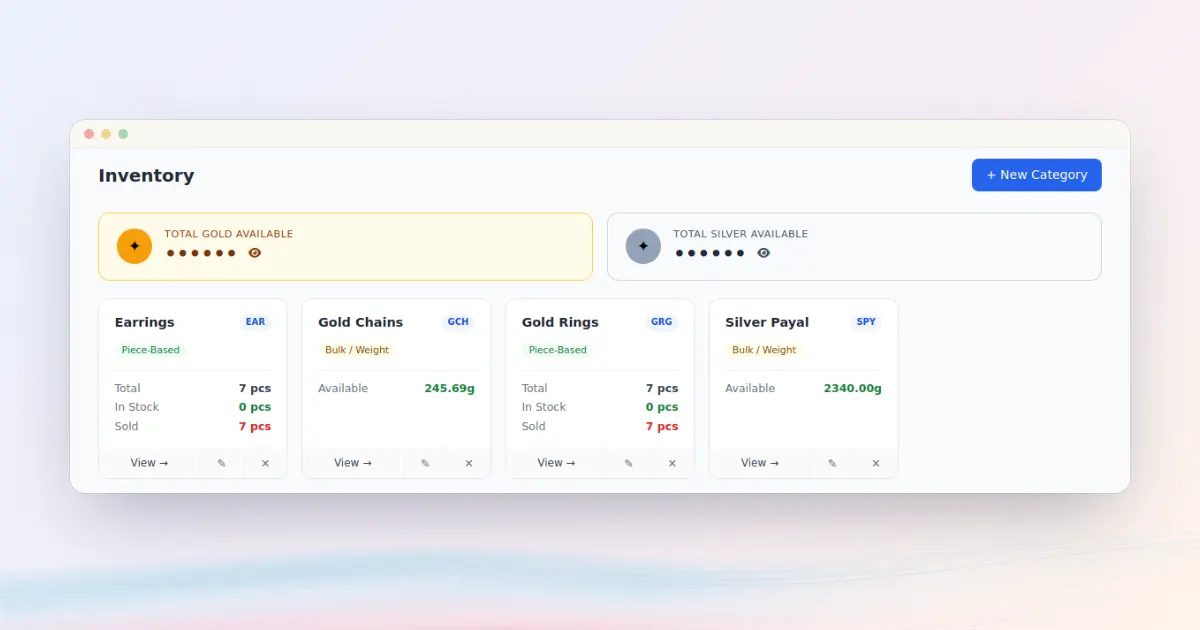
InvoiceHub is our invoicing platform, in daily use by a jewellery business. It does GST invoices as PDFs, stock and cashflow in one place, with each business's books kept apart.
The invoices were the expected part. Stock was the interesting part, so that is what this post is about.
#One shop, three kinds of stock
"Deduct stock when you sell" sounds simple until you stand in a jewellery shop. The same counter sells things that have to be counted in completely different ways.
| Kind | Example | How it's tracked |
|---|---|---|
| Piece | A single ring with its own weight | Each item flips between in stock and sold |
| Weight | Loose metal sold by the gram | Stock received minus weight sold, worked out when needed |
| Count | A batch of identical items | A quantity that goes down and up |
A single "quantity" column can't hold all of that. A unique ring has no quantity, it either exists or it doesn't, and we want to remember what it weighed on the day it sold. Loose stock has no items at all, only grams.

#Stock that can't drift
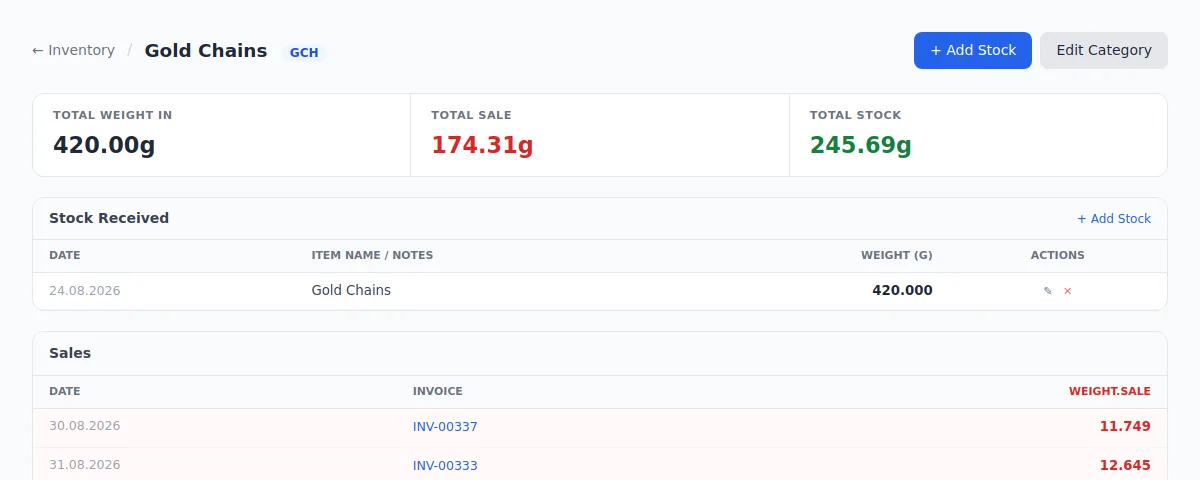
For weight-based stock, the system stores no balance. Available weight is always calculated from two ledgers, what came in and what went out on invoices:
received = category.stock_entries.aggregate(t=Sum('weight'))['t'] or Decimal('0')
lines = LineItem.objects.filter(category=category, line_type='weight')
sold = lines.exclude(invoice__status__in=['draft', 'cancelled']).aggregate(t=Sum('weight'))['t'] or Decimal('0')
With no stored balance, there's nothing to fall out of step with the invoices. Drafts and cancelled invoices use up nothing, so cancelling a sale needs no correction. The invoice form's stock check counts the same way.
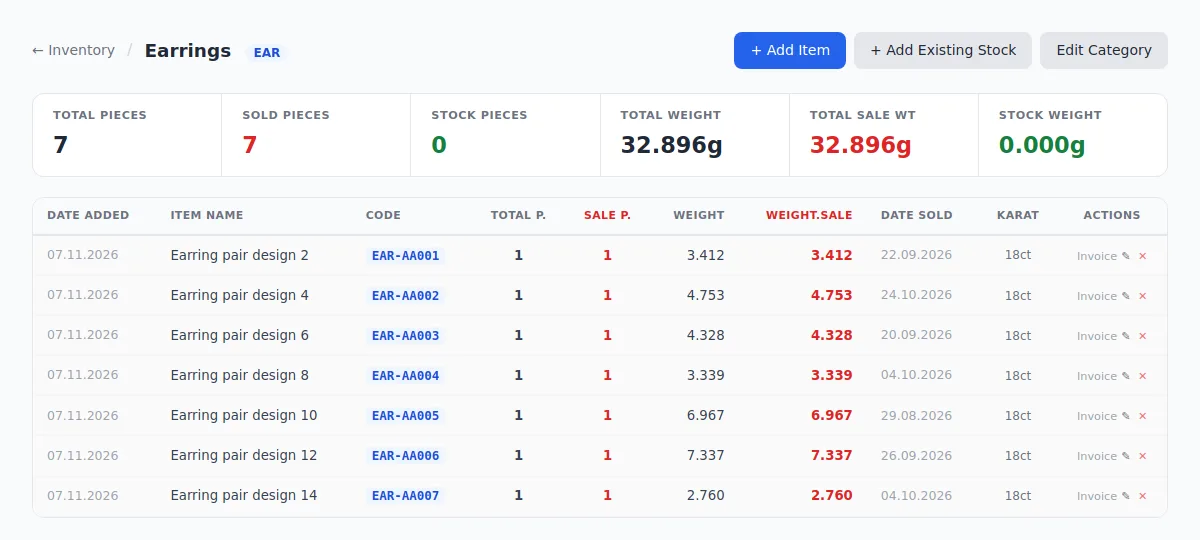
Piece and count stock do store state, so those changes run through one small service. It marks items sold when an invoice is issued, and puts them back if it's cancelled. Each sold piece keeps its weight at sale and the invoice it left on, so the record stays true even if the item's details change later.
#Changing your mind about stock
Shops change how they work. Stock sold by weight sometimes gets counted in pieces later, and that sounds like a data migration: rewrite the old records, hope the reports still add up.
We chose not to rewrite anything. A conversion keeps the old stock entries and past sales exactly as they are, and creates one opening batch holding the remaining weight and the number of pieces the shop actually counted. Past invoices, sales reports and cashflow don't change.
This is the riskiest moment in the system, because a wrong number here means a wrong stock count from then on. So the code refuses rather than guesses, and each refusal is a sentence the shop can act on:
| Situation | What happens |
|---|---|
| Draft invoices still use this stock | Lists them and asks you to finish or delete them first |
| More sold than received | Asks you to fix the stock entries first |
| Stock changed since the page was opened | Shows the new figure and asks you to check again |
| Weight left but zero pieces entered | Asks how many pieces that weight is |
| Convert tapped twice | The second tap waits on a row lock, then sees the work is already done |
The whole thing runs in one database transaction, so it either happens completely or not at all.
#Small things that matter daily
Most of the later work came from watching how the software is really used.
Reminders people will read. A payment reminder is one message, in English and then the same text in Hindi, with one short link to a page listing all of that customer's unpaid bills. The text can be edited before sending, an alternate phone number can be used, and the app remembers when a customer was last reminded.
Money that looks right. Amounts use Indian digit grouping everywhere: ₹1,23,456.00, not ₹123,456.00.
A demo that stays clean. A demo shop with sample data resets every night, so anyone can click around without leaving a mess for the next person. No real customer data is involved.
#What we took from it
The stack is ordinary and that suits the job: Django, PostgreSQL and WeasyPrint for the PDFs. The hard parts were in understanding how the business really handles its stock, then writing that down as rules the code can enforce.
Accounts software loses people's trust quickly when a number looks off. So where we could, we made wrong numbers hard to produce: calculate instead of store, refuse instead of guess, and leave history alone.
You can open the demo from the InvoiceHub page.